



0 ratings
DinoFire USB Type C Wireless Presentation Clicker, BT&RF 2.4GHz Dual Modes Presenter Remote for PowerPoint Presentations Compatible with Bluetooth-Enabled Laptops Desktop Computers
A bright red light that is easy to see against most backgrounds to highlight your points; Control distance is long enough for you freely move around the room and interact with your audiences
DinoFire USB Type C Wireless Presentation Clicker, BT&RF 2.4GHz Dual Modes Presenter Remote for PowerPoint Presentations Compatible with Bluetooth-Enabled Laptops Desktop Computers
Item #: 203236882

DinoFire USB Type C Wireless Presentation Clicker, BT&RF 2.4GHz Dual Modes Presenter Remote for PowerPoint Presentations Compatible with

Item #: 203236882

LYD 215

Price Details

Excluding Shipping & Custom charges ( Shipping and custom charges will be calculated on checkout )

*All items will import from US

0 ratings Write a review

100+ bought

In stock
us Imported from USA store

QTY:

Order now and get it around Thursday, August 27
Our Top Logistics Partners
  • fedex
  • dhl
A bright red light that is easy to see against most backgrounds to highlight your points; Control distance is long enough for you freely move around the room and interact with your audiences
Show More
U-Care Warranty:
None
Select a Plan
fast shipping

Fast
Shipping

free return

Free
Return*

secure packaging

Secure Packaging

100% original products

100% Original Products

pci-dss

PCI DSS Compliance

iso certified

ISO 27001 Certified


paypal payment
visa payment
mastercard payment

What Stands Out

Dual Connectivity
The DinoFire Presenter offers Bluetooth and RF compatibility, ensuring versatile connections with both laptops and desktop computers, making it suitable for various presentation environments.
User-Friendly Design
Designed for ease of use, the clicker features intuitive buttons and a comfortable grip, allowing presenters to navigate slides effortlessly, enhancing the overall presentation experience.
Long Range Control
With a reliable transmission range, this presenter enables users to move freely during presentations, providing confidence and engagement with the audience without being tethered to the laptop.

Product Details

Shop DinoFire USB Type C Wireless Presentation Clicker, BT&RF 2.4GHz Dual Modes Presenter Remote for PowerPoint Presentations Compatible with Bluetooth-Enabled Laptops Desktop Computers online at a best price in Libya. B0F9PLQYN9
BrandDinoFire
Special FeatureErgonomic
ColorBlack
Max Number of Supported Devices1
Compatible DevicesLaptop, Desktop Computer
Item Weight0.3 lbs (140 grams)

Who Should Buy?

Suitable For
  • Professional Presenters

    Ideal for public speakers and professionals giving presentations, offering ease of use and reliable wireless connectivity.

  • Educators and Trainers

    Suitable for teachers and trainers who need to navigate slides effortlessly during lectures or workshops.

  • Remote Workers

    Great for remote employees who conduct virtual presentations, ensuring smooth transitions between slides and engagement.

Not Suitable For
  • Casual Users

    Not ideal for occasional users who may not need a full-featured presentation device, as it might be overkill.

Product Description

Have any Query? Chat with us

Customer Questions & Answers

  • Question: What is a Presentation Remote Clicker used for?

    Answer: A Presentation Remote Clicker is primarily used to control slides during presentations. It allows presenters to navigate through their slides without being tethered to their computers, enhancing the overall flow of a presentation. This wireless device connects via RF 2.4GHz technology, ensuring a stable connection even at a distance. It's especially useful in professional settings like conferences or meetings, where the speaker can engage more with the audience while seamlessly controlling their slides.
  • Question: How do I connect the Presentation Remote to my computer?

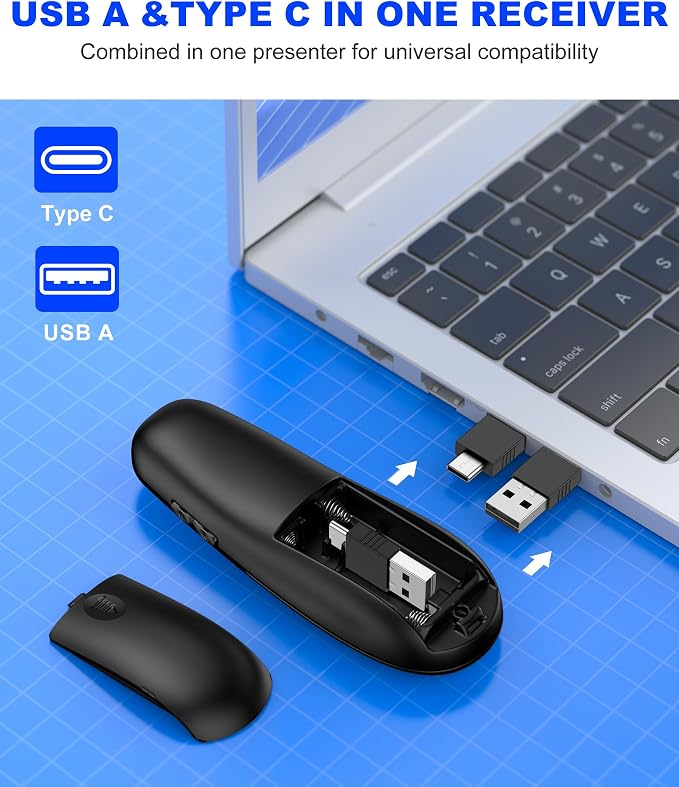
    Answer: To connect the Presentation Remote to your computer, simply plug the RF 2.4GHz USB receiver into an available USB port. Your computer should recognize the device automatically. There’s no need for additional software installation, making it convenient for immediate use. This plug-and-play feature ensures that users can quickly set up for presentations in various environments, from offices to classrooms, without hindrance.
  • Question: Is the Presentation Remote compatible with both Mac and Windows?

    Answer: Yes, the Presentation Remote is compatible with both Mac and Windows operating systems. This broad compatibility ensures that users can utilize the remote for various applications, including PowerPoint and Keynote. Whether you’re in a corporate meeting or a lecture hall, this flexibility allows you to present seamlessly, regardless of the platform you prefer to use.
  • Question: What distance can I operate the Presentation Remote from?

    Answer: The Presentation Remote offers a reliable operational range of up to 100 feet, allowing you the freedom to move around during presentations. This range is ideal for larger conference rooms or theaters, where engaging with your audience is crucial. Presenters can use it confidently without worrying about losing connectivity, thus enhancing interactivity and keeping the audience engaged.
  • Question: Does the Presentation Remote need batteries, and how long do they last?

    Answer: Yes, the Presentation Remote typically requires batteries. The battery life can last several months, depending on usage, thanks to efficient power consumption. Many remotes use standard AAA batteries, making it simple to replace when depleted. This longevity is particularly beneficial for frequent users, such as educators and business professionals who conduct regular presentations, ensuring that they are always prepared.
  • Question: Can I use the Presentation Remote for video presentations?

    Answer: Absolutely! The Presentation Remote can be used for video presentations as well, allowing you to control not only slides but also video playbacks during your presentation. The remote's functionality makes it versatile for various media types, suitable for educational videos, corporate training, or marketing demos. This versatility allows presenters to focus on their delivery without the distraction of manually operating their devices.
  • Question: What features should I look for in a Presentation Remote?

    Answer: When choosing a Presentation Remote, consider features like ergonomic design, ease of use, customizable buttons, and a range of connectivity options. Many remotes come with laser pointers, which can be beneficial for highlighting specific information during presentations. Additionally, a reliable range and quick setup time are essential for ensuring smooth performance in diverse settings, from intimate meetings to large auditoriums.
  • Question: Is there a laser pointer included with the Presentation Remote?

    Answer: Yes, most Presentation Remotes come equipped with a built-in laser pointer. This feature is instrumental for drawing attention to specific parts of your presentation or emphasizing critical data without leaving your spot. It enhances viewer engagement, allowing you to direct the audience's focus appropriately, making your presentations more effective and interactive.
  • Question: How can I ensure my Presentation Remote works properly before a presentation?

    Answer: To ensure your Presentation Remote functions properly, conduct a quick test by connecting it to your computer prior to your presentation. Check the connectivity, test the slide navigation, and ensure the battery is charged. Familiarity with its buttons and functionalities can prevent last-minute issues and enhance your confidence, ultimately leading to a successful and smooth presentation experience.
  • Question: Where can I buy Presentation Remote Clicker, Wireless Presenter for PowerPoint Presentation Remote, RF 2.4GHz USB for Mac, Keynote, Computer, Laptop?

    Answer: You can buy the Presentation Remote Clicker from Ubuy, a reliable online shopping platform that provides a wide selection of electronics and tech products. Ubuy offers access to various brands and models, helping you compare features and make an informed choice. Their user-friendly interface simplifies the purchasing process, ensuring you find exactly what you need for effective presentations.

DinoFire Presentation Remotes Editorial Review

The DinoFire USB Type C Wireless Presentation Clicker has received overwhelmingly positive feedback from users who appreciate its functionality, ease of use, and adaptability across different applications. Users have reported that the device connects seamlessly with devices such as laptops and computers, including those running Windows 11 and Macs, once a simple setup is followed. The lightweight and ergonomic design makes it comfortable to hold for extended periods, and the large buttons allow for intuitive operation, minimizing the learning curve for new users. Many customers have found the built-in features such as a bright red laser pointer, slideshow navigation, and screen blackout capabilities to be particularly useful during presentations. Teachers and church leaders highlighted the clicker's range, reporting successful operation even from significant distances (up to 100 feet), which is vital in large spaces. However, there are some drawbacks noted by customers. A common critique is the absence of a battery included with the product, which might inconvenience new users who expect it to be ready to use out of the box. Additionally, some users found the battery compartment a little challenging to open, and there were remarks about the overall build quality feeling somewhat cheap, although many felt this trade-off was acceptable given the product's price point. Overall, the DinoFire USB Type C Wireless Presentation Clicker is positioned as a reliable, cost-effective tool for anyone looking to enhance their presentation experience. Its thoughtful design and beneficial features have resonated well with educators, professionals, and organizers alike. **

Customer Reviews & Ratings

1 customers ratings
  • 5 Star
    100%
  • 4 Star
    0%
  • 3 Star
    0%
  • 2 Star
    0%
  • 1 Star
    0%

Review this product

Share your thoughts with other customers

Pros

  • Easy setup and immediate functionality
  • Lightweight and ergonomic design
  • Large, intuitive buttons
  • Strong laser pointer with good range
  • Compatible with multiple applications (PowerPoint, Adobe PDFs, etc.)
  • Excellent value for money
  • Good customer support

Cons

  • Does not include a battery

Platform Trust & Buyer Confidence

trustpilot logo
4.2/5 9250 + reviews
Read reviews
MA
Mohammad
Verified buyer

“Excellent quality and original too,when ubuy send original things I will appreciate that ,I very satisfied thank you”

23 July 2026 · via Trustpilot
CK
Chitra
Verified buyer

“The order and delivery progress was communicated very well. Package arrived within the estimated time. Products arrived as expected in good condition.”

22-Jul-26 · via Trustpilot
K
kund
Verified buyer

“Good supply of products. Safe payment methods, and shipment worldwide! Genuine products.”

23-Jul-26 · via Trustpilot
OO
Onesi
Verified buyer

“Was my first time buying a product from Ubuy, but I found it so helpful. This is reliable. Gonna place a new order!”

22 July 2026 · via Trustpilot
SJ
SAO JOHN
Verified buyer

“Ubuy is a great online platform to buy stuff. Reliable, fast delivery time and great value for money. I've been using Ubuy online shopping platform for three years now and will continue to do so.”

23 July 2026 · via Trustpilot
Secure Checkout Global Delivery Easy Returns Genuine Products

Important information

  • Limitations : For products shipped internationally, please note that any manufacturer warranty may not be valid; manufacturer service options may not be available; product manuals, instructions, and safety warnings may not be in destination country languages; the products (and accompanying materials) may not be designed in accordance with destination country standards, specifications, and labeling requirements; and the products may not conform to destination country voltage and other electrical standards (requiring use of an adapter or converter if appropriate). The recipient is responsible for assuring that the product can be lawfully imported to the destination country. When ordering from Ubuy or its affiliates, the recipient is the importer of record and must comply with all laws and regulations of the destination country.
  • Not all the products listed on Ubuy are for sale, as Ubuy is a global search engine. Products are subject to export/trade regulations.